Idea / article:jordan-context-os@1
It's All Just Files: How to Build a Context System Your AI Can Actually Use
A copyable introduction to files, reusable context, recipes, and history as the minimum useful Context OS.
Context matters since AI is only as good as the context you give it. Want great content? Ads? Internal sales collateral? A tone of voice actually grounded in real customer call transcripts?
They all need to stand on a mountain of well-organized and well-thought-through internal context if you want to use AI to help create them and learn from them.
The exact framing, sequencing and processing of context makes the difference between a valuable end article and a pile of slop.
It's like cooking. You can use the same ten ingredients to make dozens of unique recipes. Changing one step, like setting the oven to 450 degrees instead of 350, can make the difference between a delicious cake and a burnt pile of carbon.
I am going to show you a minimum version you can copy into your own system: a directory, a small set of reusable context, one recipe, and a history of how the output changed. You do not need a new platform. You need a few files and an agent that can navigate them.
The Core Bottleneck Has Always Been Context
Context mattered before AI. Shared context, stories and meaning-making are what allow us to work together.
Human beings can use intuition to fill in gaps and hold multiple potential outcomes in our heads. AI cannot do this. No matter how much raw horsepower each new model has, agents remain bounded by the context you provide.
Every piece of work you do with AI is now capped by the quality of your context.
Every campaign, customer call, product decision and workflow teaches you something. More often than not, those learnings stay trapped in a meeting, a Slack thread, or a one-off AI chat. The next time you do the work, you have to reconstruct what you already knew.
The goal is not to remove human judgment. It is to offload the capture of the why so the decision process can be referenced and reused later.
The Basics: A Reminder on How Files Work
Remember the first time you learned how to use a file system?
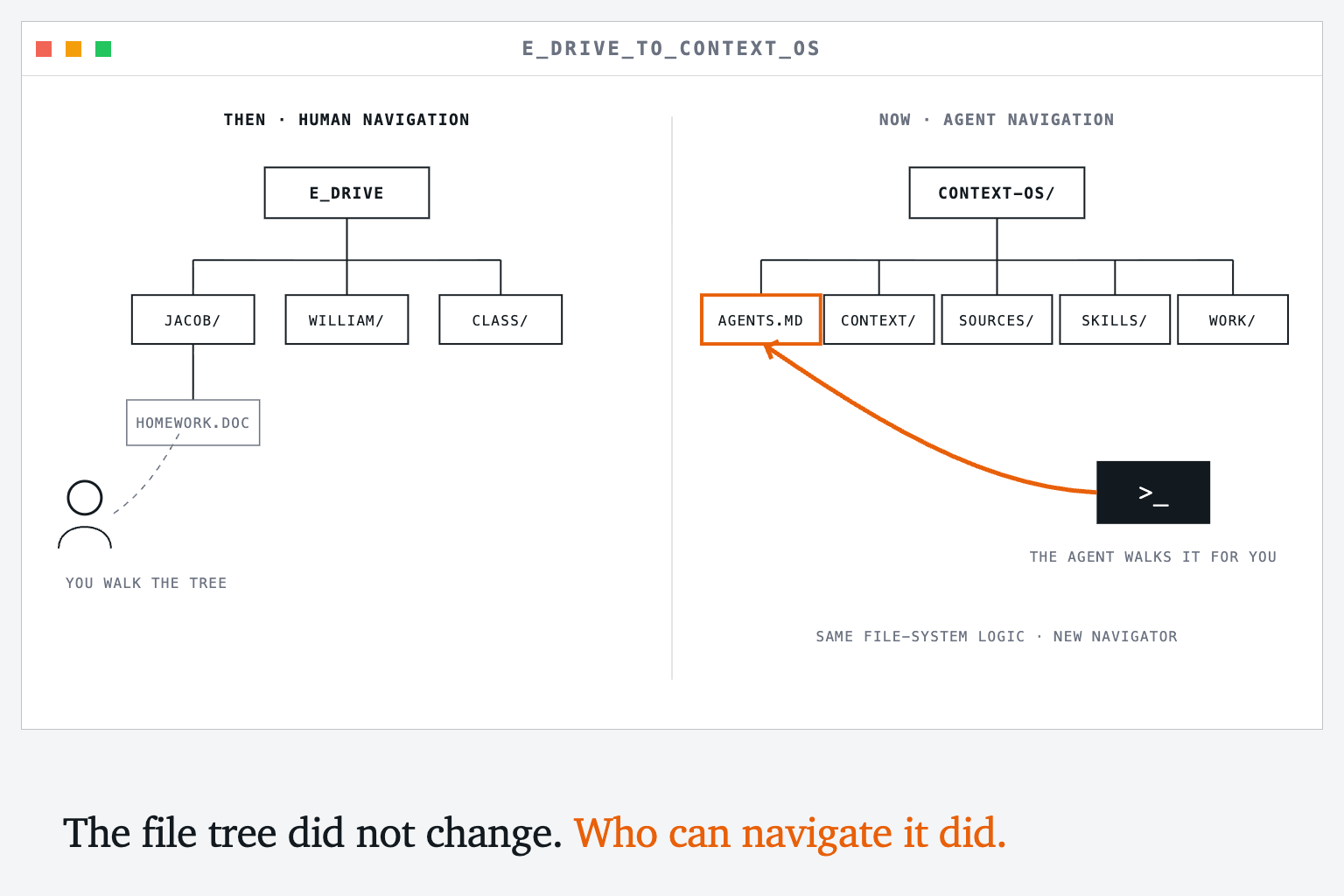
For me it was in Mr. Barker's elementary-school computer lab. We spent the whole class learning how to take a Word document and save it to the E drive, the network drive that all the computers were connected to.
We each created our own folder for our work. If you clicked in and out—there was no real-time refresh on Windows Vista—you could see other kids' folders show up as they created them.
This tree logic, and the art of navigating it, has been forgotten. Modern apps hide it behind auto-saves, in-app databases and other layers of abstraction.
That made sense when humans were doing all the navigating. People do not naturally think in linear trees, and mentally walking through a file system is a pain in the ass.
But now Claude Code, Codex and other agents can walk those paths for us.
The first thing to know about a Context OS—and its more popular cousin, the LLM wiki—is that it goes back to basics. It is all files in a file system.
Build the Smallest Useful Context OS
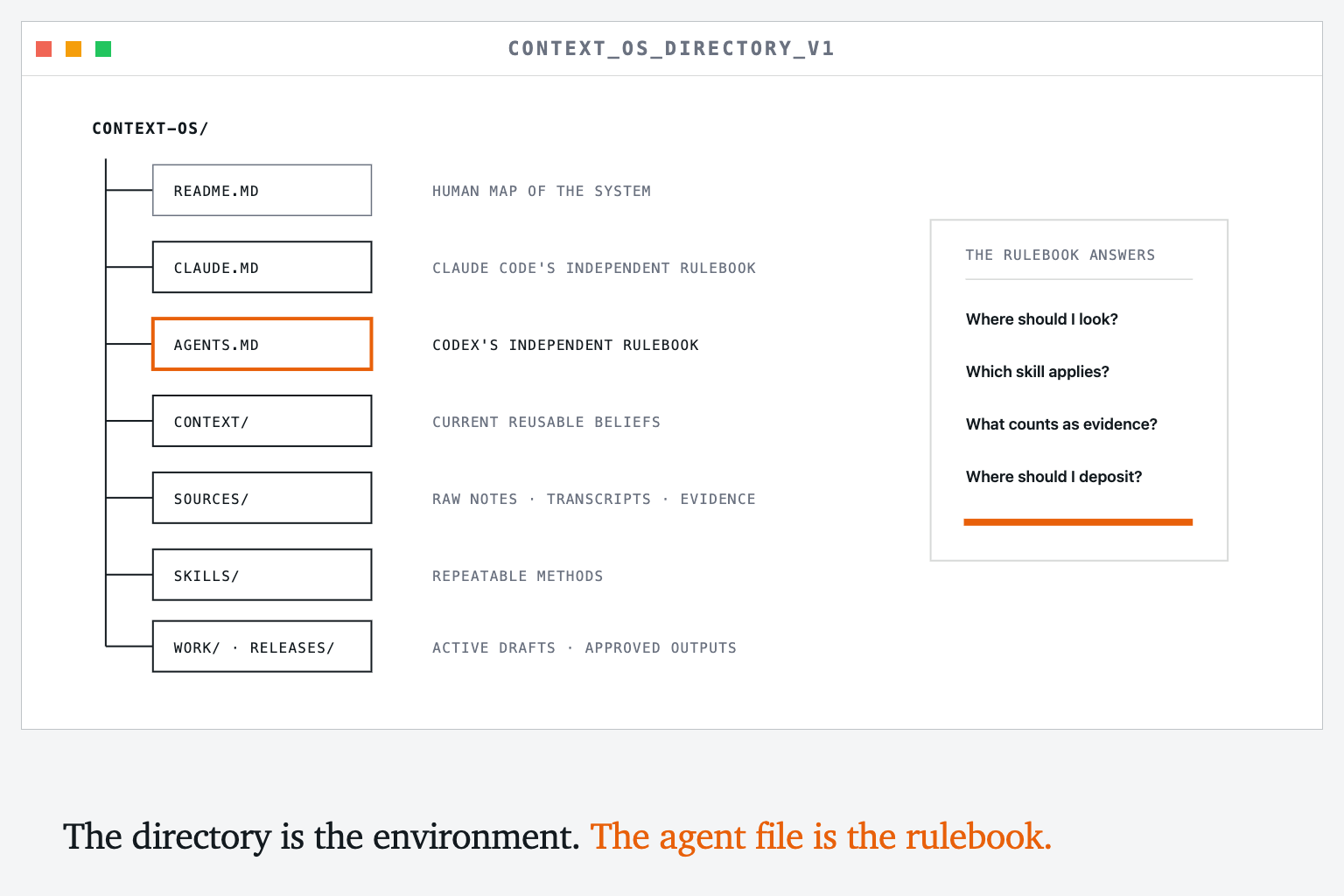
Think back to the E drive. The drive itself was just shared storage. What made it usable was that Mr. Barker gave us a map and a small set of rules before turning us loose: this is your folder, this is where your work goes, and this is how you save it.
A personal Context OS needs the same thing. The directory is the E drive. README.md can explain the system to another person. CLAUDE.md and AGENTS.md independently tell Claude Code or Codex where things live, what rules to follow, and which skills to use for repeatable work. They are not pointers to human documentation. They are the operating instructions for the agent using the system.
Do not begin by designing the perfect taxonomy for everything you know. Begin with one directory, one rulebook, and the context you repeatedly need for real work.
You can copy this structure:
context-os/
├── README.md          # A human-readable map of the system
├── CLAUDE.md          # Claude Code's operating guidance
├── AGENTS.md          # Codex's operating guidance
├── context/
│   ├── about.md
│   ├── audience.md
│   ├── positioning.md
│   ├── product.md
│   └── voice.md
├── sources/
├── skills/
│   └── guest-post/
│       └── SKILL.md
├── work/
└── releases/
These folders are not separate systems. They are different roles inside one working corpus: sources preserve what happened, context holds what you currently believe, skills describe how to perform repeatable work, work holds drafts, and releases hold the outputs you are willing to reuse.
Here is a lightweight but real AGENTS.md you can paste into the root:
# Context OS

This directory is a working context system. Its job is to preserve what I learn, make that context reusable, and help turn it into better work without erasing where it came from.

## Directory map

- `/context` — the small set of current beliefs and reusable ingredients
- `/sources` — raw notes, transcripts and other evidence
- `/skills` — repeatable methods the agent should follow
- `/work` — active drafts and intermediate artifacts
- `/releases` — outputs I have approved for reuse

## Before starting

1. Identify the actual outcome I am asking for.
2. Read the relevant files in `/context`.
3. Search `/sources` and `/work` before creating something new.
4. Check `/skills` for a relevant `SKILL.md` and read it completely before acting.

## Working rules

- Preserve source material. Never silently rewrite evidence to fit a conclusion.
- Distinguish what the sources verify from what you infer.
- Preserve my original language when editing. Mark substantial agent-written additions.
- Prefer updating the current artifact over creating duplicate `final_v2_REAL.md` files.
- Work in `/work`. Move something to `/releases` only when I approve it for reuse.
- After meaningful work, leave the system easier to understand than you found it.
If you use Claude Code, give it its own CLAUDE.md. Keep it equally small and self-contained:
# Context OS

You are working inside my personal context system. Help me reuse what I already know, preserve the evidence behind it, and deposit useful work back into the system.

## Start every task

1. Clarify the requested outcome from the prompt and available files.
2. Read the relevant files in `/context`.
3. Search `/sources` and `/work` for prior thinking before drafting.
4. Read any relevant `/skills/*/SKILL.md` completely before using it.

## Rules

- Treat `/sources` as evidence, not material to rewrite.
- Separate sourced claims from inference.
- Keep my existing language intact unless I ask for a rewrite.
- Put drafts in `/work`; do not declare something reusable or final without my approval.
- Capture reusable procedures as skills instead of leaving them trapped in a chat.
That is Mr. Barker's rulebook made executable. Each agent gets instructions written for the environment it actually enters. You do not have to explain the E drive again every time a new session begins. The agent reads its own rulebook and knows how to navigate the system.
That is enough structure to begin. Capture first. Classify later, once repeated use shows you which distinctions actually matter.
The Reusables: What Goes in the File System?
Let's keep using the recipe analogy. What do you keep in your pantry? For those who live on takeout and have nothing but some pickles and year-old ketchup, please play along.
You probably keep basics you use frequently: milk, eggs, rice, pasta, cheese, salt, pepper, butter. Stuff you need across many recipes.
That is what you should put in your context system first. For GTM, that is probably:
context/
├── about.md          # What the company does and why it exists
├── audience.md       # Who you serve and what they care about
├── positioning.md    # Why they should choose you
├── product.md        # What you actually sell
└── voice.md          # How you sound, with real examples
You don't need every ingredient for every recipe, and you don't need every possible snippet of context stored. Most of the advantage comes from reliably finding the small number of ingredients that matter for the work in front of you.
Start by writing what you know. Put the evidence behind it in /sources. If a customer call changes your positioning, update positioning.md and keep the call note or transcript that caused the change. Your current belief stays easy to use without erasing how you arrived there.
Make Your First Recipe: A Guest Blog Post :)
If you happen to be invited to write a guest post for your friend's newsletter, you probably want to make sure it is your best work: your best ideas, lessons from building your own system, and experience working with clients distilled into a simple and understandable frame.
You may even procrastinate a bit because you realize you have a lot of thinking to do to get it organized. Sorry, Jordan.
Then you remember your recipe system. It cannot think for you, and writing is thinking, so you still need to make time for that. But it can help you pull together previous content and context, see where each idea came from, and assemble a draft without starting from zero.
For something you expect to do more than once, turn the recipe into a skill. A recipe describes the steps. A skill packages those steps with the context an agent needs to apply them reliably.
In the E-drive analogy, the files are the students' work. The skill is the procedure Mr. Barker taught us: open the right folder, use the right name, save in the right place, and check that the file is actually there. He did not need to reteach the procedure over our shoulder every time we created a document.
Create skills/guest-post/SKILL.md and paste this in:
---
name: guest-post
description: Use when developing a guest article from existing notes, published work and lived examples.
---

# Guest Post Recipe

## Outcome
A useful, original article for a specific audience, ready for the author to review.

## Inputs
- The audience and publication
- My raw outline or scratch-note draft
- Relevant previous articles
- Relevant concepts from my context system
- Concrete examples from my own work

## Process
1. Inventory the available sources and say what each contributes.
2. Identify the central argument in one sentence.
3. Build an outline that earns that argument.
4. Trace every substantial claim or example to a source.
5. Assemble one section at a time.
6. Preserve my original language and visibly mark agent-written additions.
7. Check the draft for repetition, abstraction and unsupported claims.

## Definition of done
- The reader can explain the central idea after one read.
- Every section changes what the reader understands or can do.
- The examples are concrete enough to reproduce.
- I have reviewed and accepted the final language.
Now give your agent this instruction:
Use the guest-post skill to help me develop this article.

First, read README.md and inventory the relevant files in this directory. Do not draft yet. Show me which sources you found, what each contributes, the central argument you see, and what evidence is missing. Preserve my original language and mark anything you add.
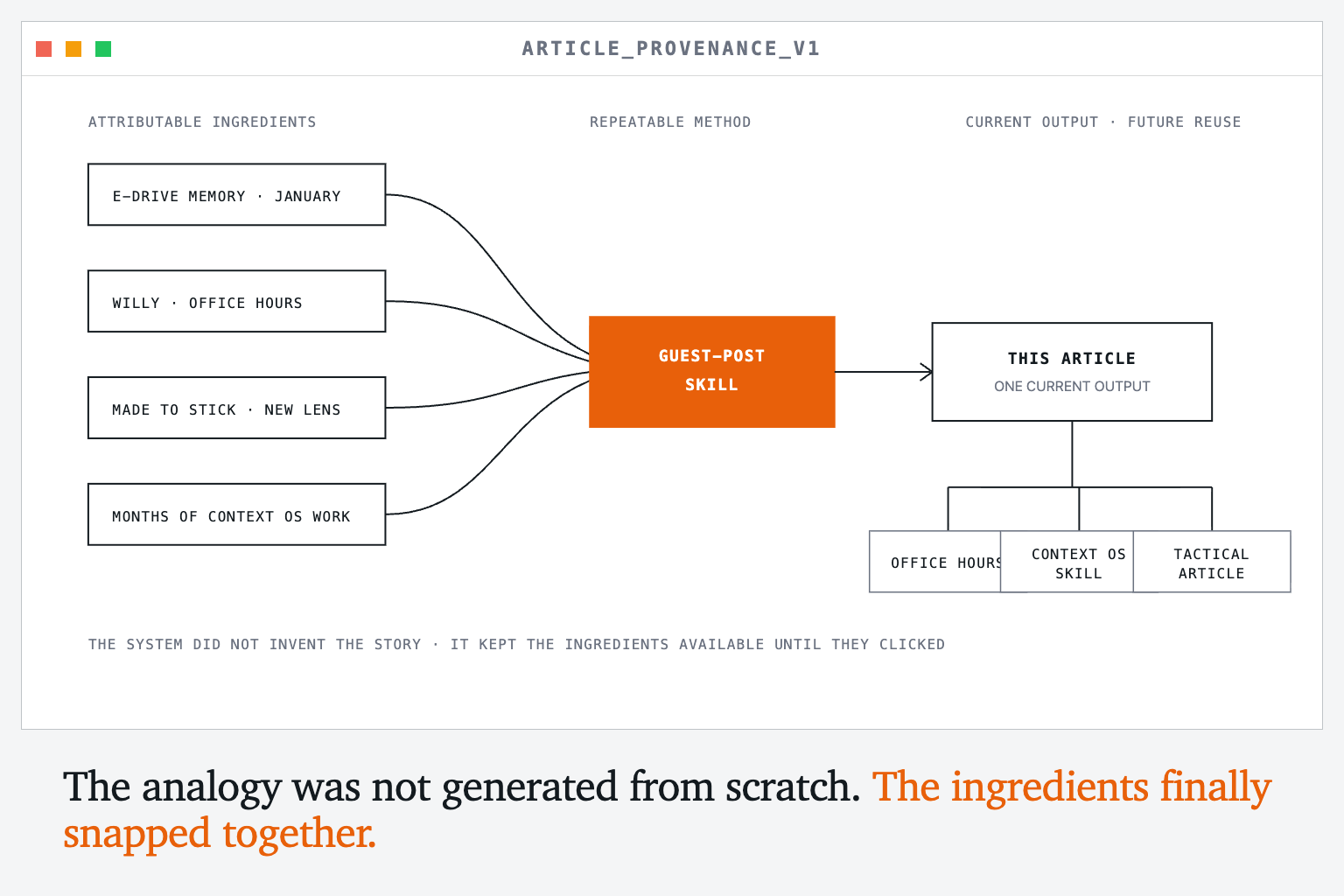
I couldn't tell you exactly how the E drive came back to mind. I had used the file-system analogy months earlier, around January, to explain context systems and then mostly forgot about it.
Later, Willy mentioned a one-off comment I had made during office hours. He didn't remember my exact point, only that I had said something about file systems and an E drive. That resurfaced the memory.
In the meantime, I had spent months building my own Context OS, working through these problems every day, and reading Made to Stick. That book ever so slightly shifted my point of view so I was better able to recognize a sticky story when I saw one.
When the E drive resurfaced, all those ingredients snapped into place. The analogy was not generated from scratch for this article. It had been sitting in the system, accumulating meaning until I could finally see the whole shape.
The raw ingredients for this article included my scratch-note draft, concepts from previous articles, the E-drive story from my childhood, lessons from client work, and months of thinking about how context systems break as they grow.
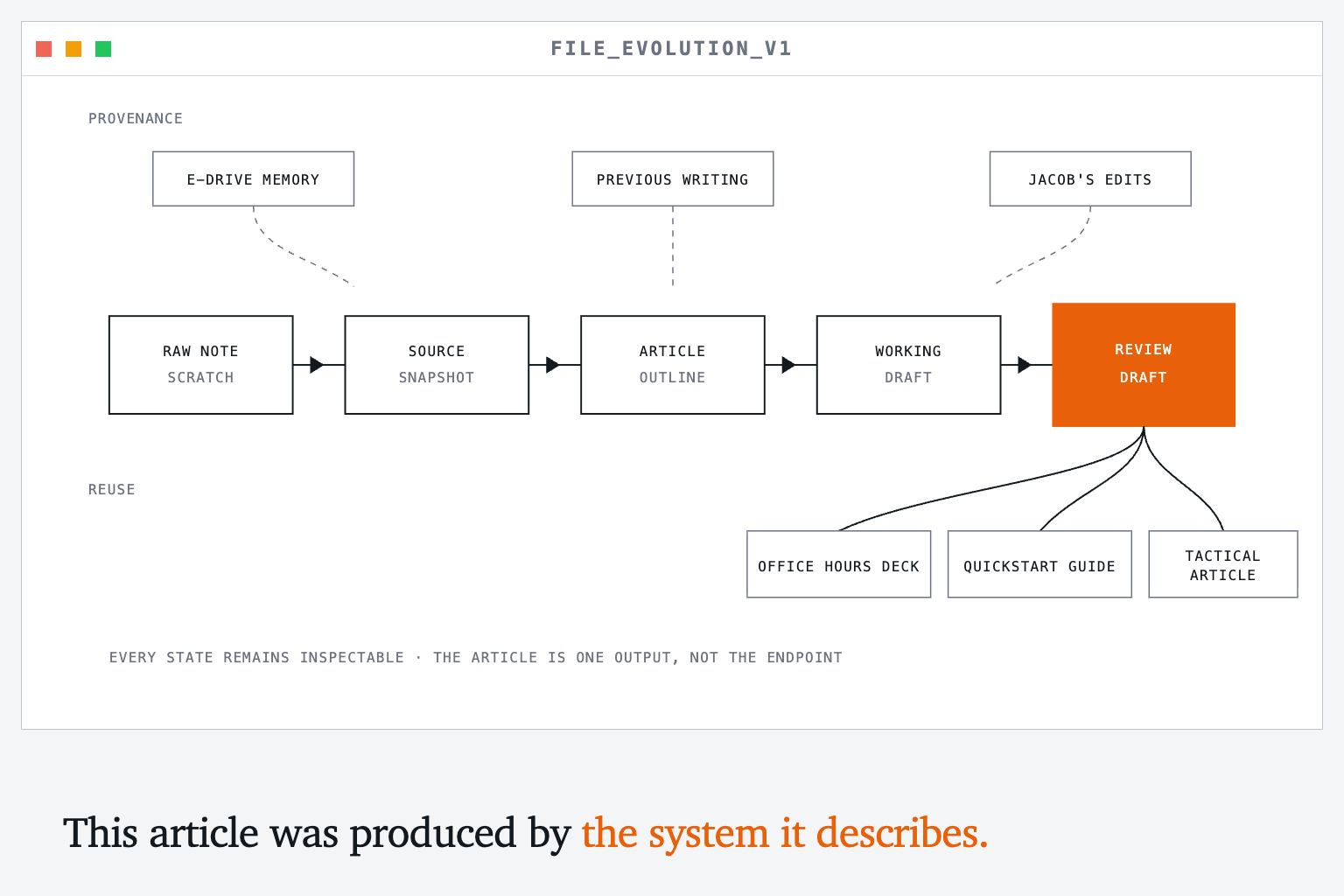
The article is one output assembled from those ingredients. The same ingredients can later become an office-hours deck, a skill, a workshop, a quickstart guide, or another article.
Keep the History, Not Five Copies
You need one more thing if you want the system to learn over time: a history of what changed.
Git's formal name is a content-addressable version control system. All that means is that it takes a snapshot of your work at a given time, assigns a unique fingerprint to it, and records which snapshot came before it.
Take positioning.md. You learn something new on a customer call. Instead of creating positioning_v2.md, you save a snapshot and edit the main document. The previous version is not lost. Git can calculate the exact difference between the two versions.
Over time, that difference tells a story. A week, a month or six months of snapshots shows how your positioning changed as you talked to customers and learned.
If you do not use Git, paste this into an agent that can work with local files:
Initialize Git in this Context OS directory without publishing it anywhere.

Create an initial snapshot of the current files. After that, before any substantial rewrite, show me what has changed and create a descriptive snapshot that explains what changed and why. Never delete or overwrite history to clean things up.
Git does not decide which version is good. It makes the history inspectable so you can make that decision with better context.
Build-Time Context and Runtime Context
In software, build time is when you assemble something before you need to run it. Runtime is what happens while the application is running.
The same distinction is useful for context.
| Build-time context | Runtime context | |
|---|---|---|
| What it is | Knowledge you prepare before the work begins | Current information fetched while the work is happening |
| Examples | Positioning, audience, voice, operating principles, quality criteria | CRM records, pipeline numbers, support tickets, product data |
| Core question | What do we believe, and how should we work? | What is happening right now? |
| How to maintain it | Owners, evidence, versions and releases | Reliable access, permissions and current retrieval |
If Claude reviews your CRM and writes a pipeline report, it is fetching runtime context. If it uses your approved positioning, sales methodology and definition of a qualified opportunity to interpret that pipeline, it is using build-time context.
Do not copy your entire CRM into this directory. Add a reference explaining where the live data lives and when the recipe should retrieve it. Deposit the resulting observation only when it is evidence you will want later.
Where This Simple System Breaks
This setup works because one person can keep ownership, meaning and approval mostly implicit. You know which files you trust and when a draft becomes reusable.
The moment another person or team begins depending on the system, those assumptions have to become explicit. Who owns positioning? Who can see the customer transcripts behind it? Who can propose a change? When is a new version ready for everyone else to use? What downstream work becomes stale when it changes?
That is the adult version of Mr. Barker's E drive. It worked because someone had already decided where files should live, which folders belonged to which students, and what each person could change. Centralized standards and permissions allowed us to collaborate without Mr. Barker standing behind every student and supervising every save.
Solving that multiplayer problem requires ownership, lifecycle design, permissions, releases and knowledge dependencies. That is a deeper build, and it is the subject of the companion article. Do not start there. First prove that one useful recipe can reliably turn your own context into better work.
Start Here
You can build the first version today:
- Create the directory.
- Paste in the
README.mdrules. - Add the five context files you use most.
- Choose one real output you need to make.
- Write or copy the recipe for it.
- Create the first snapshot.
- Use the result, learn from it, and update the system.
The file-evolution timelapse at the bottom of this article is not an illustration of the process. It is the process. You can watch the file move from raw thought to a structured argument and inspect the exact change at every step. Then you can follow its ingredients backward into the context system or forward into the next article, skill, workshop or client engagement.
And to remind you one more time: it is all just files. A Context OS is not an exotic new category. It is a return to a model we already understood, now made practical because agents can navigate the file system for us—with recipes, evidence and history built on top.