Idea / article:your-collaboration-bottleneck@2
Your Collaboration Bottleneck: Why Context Matters
Every piece of AI work is capped by context quality. Context systems turn scattered implicit tribal knowledge into a compounding learning system.
From Scattered Tribal Knowledge to Org-wide Compound Learning Loops
Context matters since AI is only as good as the context you give it. Want great end content? Or ads? Or internal sales collateral? Tone of voice actually grounded in real customer call transcripts?
They all need to stand on a mountain of well organized and well-thought internal context if you want to use AI to help create them and learn from them.
But stepping back quickly, remember this: Context mattered before AI. Shared context, stories and meaning-making are what allows us to work together.
Our ability to tell stories is the biggest differences between human beings and any other animal on the planet. Working together. We work together well in part by using our intuition. You can use your intuition to fill in the gaps and hold multiple potential outcomes in your head.
AI cannot do this. No matter how raw horsepower each new model has, there is a fundamental difference between human intuition and artificial intelligence.
Agents are a tool, bounded and hard capped by the context you provide. Every piece of work you do with AI is now capped by the quality of your context.
Single player context - End Artifact Quality:
The exact framing, sequencing and processing of context makes the difference between a well thought valuable end article and a pile of slop.
It's like cooking, you can use the same 10 ingredients to make dozens of unique recipes. And changing one step, like maybe you set the oven to 450 F instead of 350 F, can make the difference between a delicious cake and a burnt pile of carbon.
Context is both the limiting factor on for the end product quality of your single player AI and collaboration across your org.
Multiplayer Context - Learning Loops:
As AI spreads across your company, shared context becomes the constraint.
One team updates the ideal customer profile while another uses an old version. Buyer language stays trapped in calls. Product decisions lose the evidence and reasoning behind them that makes the decision making process self-evident and reusable later.
Every campaign, customer call, product decision, and workflow teaches your company something.
But more often than not, these learnings are trapped with the person or team that earned them. Sharing learnings is 1:1, ad hoc and time consuming.
When it is time to handoff learnings to another team, the new team has to entirely reconstruct the context before it can act.
A well architectured context systems, with the internal know how and culture around to use it, flips this. Every new decision starts with the full record of what the company has learned.
Your teams still decide what becomes shared context; the system preserves why each decision was made, with its evidence and reasoning.
It turns scattered implicit tribal knowledge into a compounding learning system. Each team benefits from the learnings of the last accelerating iteration tempo.
Context Systems are not New: A Reminder on How Files Work
Remember the first time you learned how to use a file system?
For me it was in elementary school in the Mr. Barker's computer lab, we spent the whole class learning how to take a word document and save it to the E drive, the network drive that all the computers were hooked up to.
We each created our own folder for our work, and you if you clicked in and out (no real time refresh on Windows Vista) you could see other kids' folders show up as they created them.

A computer lab that looked very similar to the one I had as a kid!
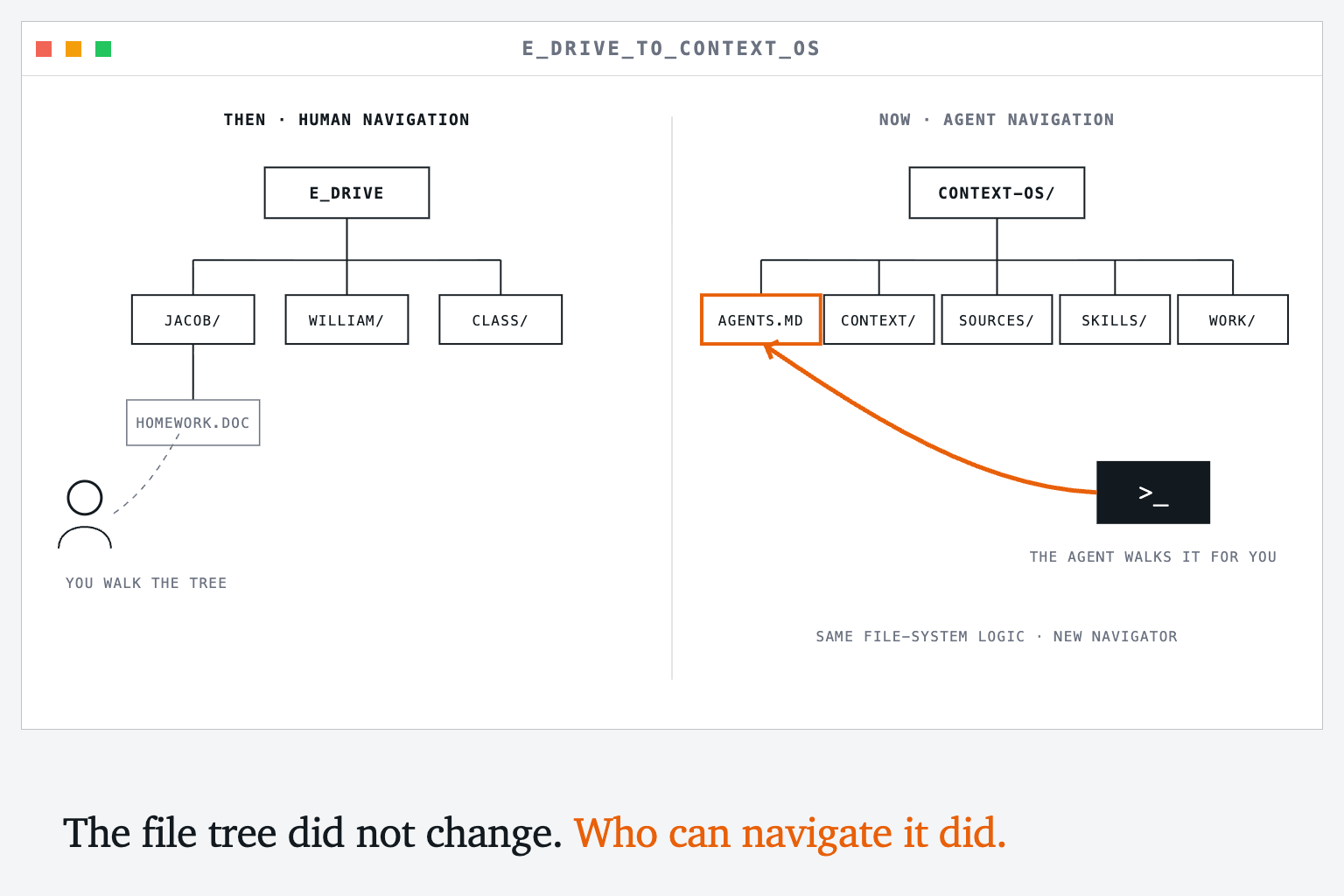
This core logic tree logic, and the art of navigating it has been forgotten. Our modern apps literally hide all of this for us, behind auto-saves, in-app database and other layers of abstraction.
And this makes sense, since it is actually a pain the ass to have to mentally walk through these file systems all the time. People don't really think in linear trees. But that was before you had AI that could walk the paths for you.
Every app you use (Slack, HubSpot, Notion, Salesforce) is just reading and writing files at some level. They hide the complexity of such a file system from you behind a UI, databases and other layers of intermediary logic.
That made sense when humans were doing the work. The file system was just a way to organize information that was acceptable enough for people to use and worked in a computer.
Now with the advent of tools like Claude Code, Codex and Opencode, AI can do the work of navigating around your filesystem. And now all those extra layers, those databases and app UIs, that complexity in between you and the base computer is getting in the way.
So the first thing to know about a Context OS, and it's far more popular cousin the LLM Wiki, is that it goes back to basics since AI is now making what was hard back then 100x easier. Its all files in a filesystem.
The Reusables: So what do we put in our File System
Lets keep using that recipe analogy. What do you keep in your pantry? For those who live on take out and have nothing but some pickles and year old ketchup please play along. (another good analogy to use it legos like a bucket of legos can make anything you can imagine.)
You probably keep a lot of basics that you use frequently. Milk, eggs, rice, pasta, cheese, salt, pepper, butter, whatever right. Stuff that you always need in most of your recipes.
The same way you don't need every ingredient for every recipe you don't need every possible snippet of context stored. Most of the advantage comes from reliably finding the small number that matter for the work in front of you.
Start by writing what you know. Put the evidence behind it in /sources. If a customer call changes your positioning, update positioning.md and keep the call note or transcript that caused the change. Your current belief stays easy to use without erasing how you arrived there.
Building the Smallest Useful Context OS
Singleplayer Context Version: Local Filesystem
*Think back to the E drive. The drive itself was just shared storage.
What made it usable was that Mr. Barker gave us a map and a small set of rules before turning us loose: this is your folder, this is where your work goes, and this is how you save it.*
A personal Context OS needs the same thing. The directory is the E drive. README.md can explain the system to another person. CLAUDE.md and AGENTS.md independently tell Claude Code or Codex where things live, what rules to follow, and which skills to use for repeatable work. They are not pointers to human documentation. They are the operating instructions for the agent using the system.
Do not begin by designing the perfect taxonomy for everything you know. Begin with one directory, one rulebook, and the context you repeatedly need for real work.
You can copy this structure:
context-os/
├── README.md          # A human-readable map of the system
├── CLAUDE.md          # Claude Code's operating guidance
├── AGENTS.md          # Codex's operating guidance
├── context/
│   ├── about.md
│   ├── audience.md
│   ├── positioning.md
│   ├── product.md
│   └── voice.md
├── sources/
├── skills/
│   └── guest-post/
│       └── SKILL.md
├── work/
└── releases/
These folders are not separate systems. They are different roles inside one working corpus: sources preserve what happened, context holds what you currently believe, skills describe how to perform repeatable work, work holds drafts, and releases hold the outputs you are willing to reuse. Here's a simple AGENTS/CLAUDE.MD:
# Context OS

This directory is a working context system. Its job is to preserve what I learn, make that context reusable, and help turn it into better work without erasing where it came from.

## Directory map

- `/context` — the small set of current beliefs and reusable ingredients
- `/sources` — raw notes, transcripts and other evidence
- `/skills` — repeatable methods the agent should follow
- `/work` — active drafts and intermediate artifacts
- `/releases` — outputs I have approved for reuse

## Before starting

1. Identify the actual outcome I am asking for.
2. Read the relevant files in `/context`.
3. Search `/sources` and `/work` before creating something new.
4. Check `/skills` for a relevant `SKILL.md` and read it completely before acting.

## Working rules

- Preserve source material. Never silently rewrite evidence to fit a conclusion.
- Distinguish what the sources verify from what you infer.
- Preserve my original language when editing. Mark substantial agent-written additions.
- Prefer updating the current artifact over creating duplicate `final_v2_REAL.md` files.
- Work in `/work`. Move something to `/releases` only when I approve it for reuse.
- After meaningful work, leave the system easier to understand than you found it.
That is enough structure to begin. Capture first. Classify later, once repeated use shows you which distinctions actually matter.
Making Your First Recipe: A Guest Blog Post :)
If you ever happen to be invited to write a guest post for your friend's newsletter, you probably want to make sure its your best work. The sum total of all your best ideas, learnings from working on your own system and with clients all distilled into an actually simple and understandable frame.
You may even procrastinate this a bit, since you realize you have a lot of thinking to do get it all organized (sorry Jordan!!!)
But then you remember your recipe system! You know it cannot think for you, and that writing is thinking so you should make time for that, but you can use your context system to help you pull together your previous content and context to ideate, iterate and ultimately assemble a draft faster.
So what ingredients are you working with?
*The raw material might include a scratch-note draft, an audience observation, ideas from previous articles, concepts from a knowledge base, and sentence snippets from previously published content. The article is one output assembled from those ingredients.
Use a skill to assemble here. For our example, create skills/guest-post/SKILL.md and paste this in:*
---
name: guest-post
description: Use when developing a guest article from existing notes, published work and lived examples.
---

# Guest Post Recipe

## Outcome
A useful, original article for a specific audience, ready for the author to review.

## Inputs
- The audience and publication
- My raw outline or scratch-note draft
- Relevant previous articles
- Relevant concepts from my context system
- Concrete examples from my own work

## Process
1. Inventory the available sources and say what each contributes.
2. Identify the central argument in one sentence.
3. Build an outline that earns that argument.
4. Trace every substantial claim or example to a source.
5. Assemble one section at a time.
6. Preserve my original language and visibly mark agent-written additions.
7. Check the draft for repetition, abstraction and unsupported claims.

## Definition of done
- The reader can explain the central idea after one read.
- Every section changes what the reader understands or can do.
- The examples are concrete enough to reproduce.
- I have reviewed and accepted the final language.
Elsewhere, the knowledge base holds concepts that can outlive this article, the foundation holds assembled operating context, and skills hold repeatable processes for turning that context into work.*
You can get the idea from these visuals:
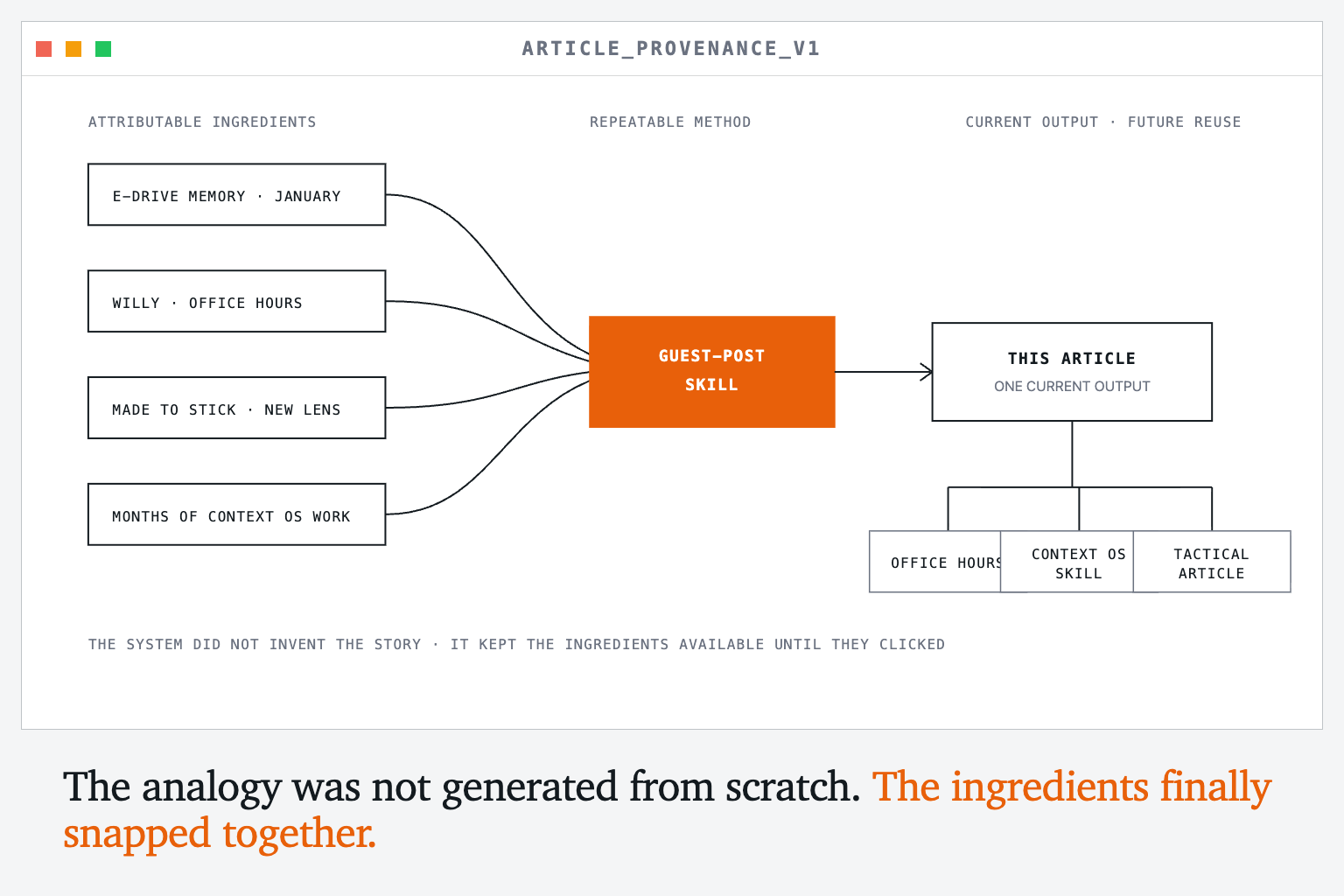
I wrote the E drive story, the filesystem, basically everything in this post myself, but I didn't do it all at once. So I used my personal context OS to pull them all together and help me find the right structure. I reused my ingredients.
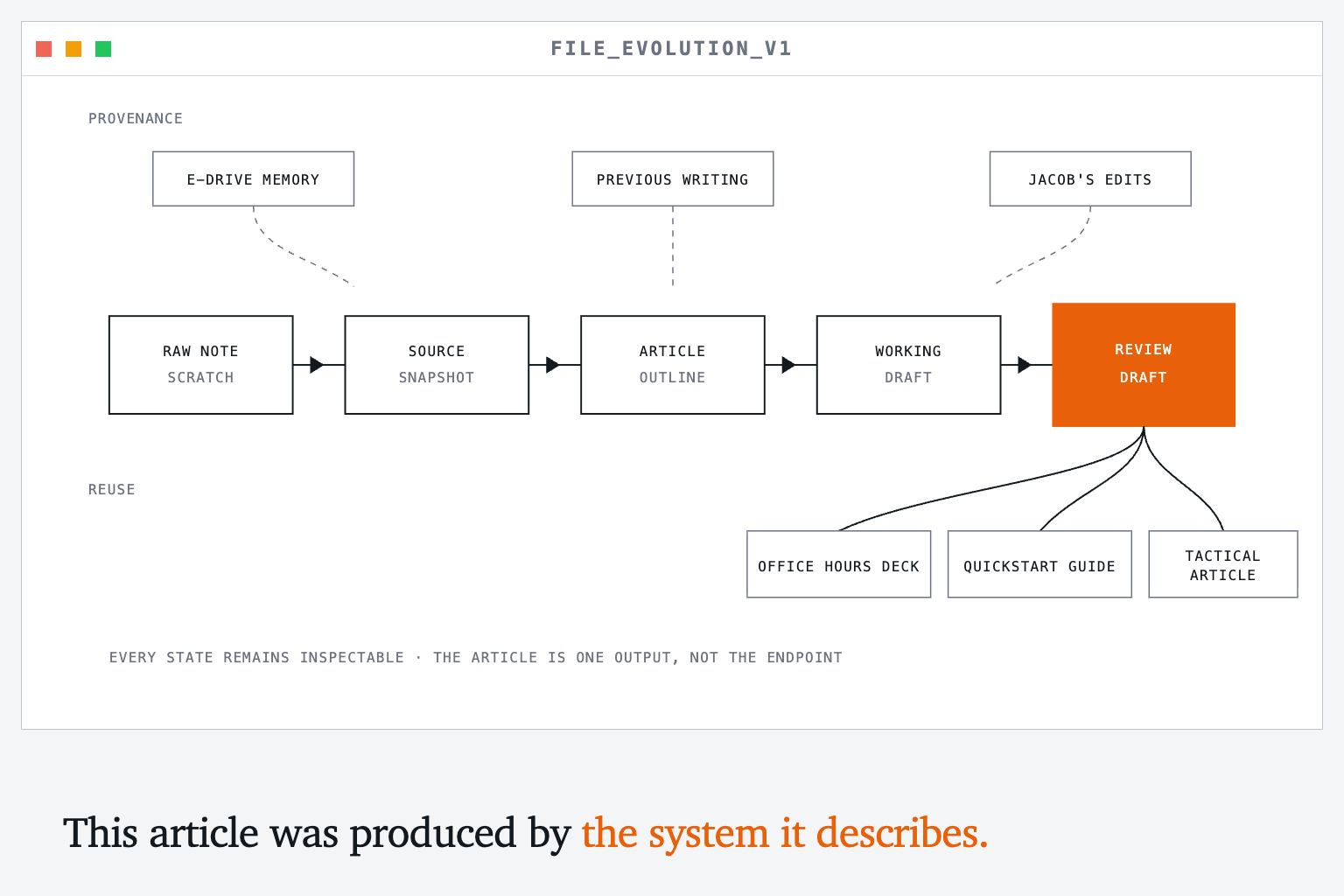
The system is centered around my writings and thinking, it does not replace it. Thinking is writing and writing is thinking, never outsource your thinking.
Instead amplify your thinking by using a system like the one above.
Context is Harder with Others (But worth it!)
Lets use the E drive as the multiplayer context example. It was easy for me and the other students to collaborate in a shared file system since someone else, our teacher, setup the permissions, working environment and agreed up standards.
Jacob only gets to write in his folder, he can't go into William's folder and start editing William's english homework.
Centralized standards and permissions enables decentralized collaboration and learning.
When you start collaborating with your team on a shared context system, you have to design a lot of stuff that we're not really used to designing explicitly.
These include:
- Architectural Design: What context do we actually need to represent our collective knowledge?
- Lifecycle management: Who is responsible for each part of it? How do we keep it accurate and update it over time?
- Collaboration & Permissions: After we figured out who is responsible for each part, what standard process do we use so it easy to collaborate on that context? Who gets access to what parts of the knowledge system and why?
Since otherwise if you don't explicitly think about these ahead of times you get the adult equivalent of Jacob "accidentally" overwriting Williams english homework because he wanted to install Civilization 4 mods and had no idea what he was doing (sorry William).
Or Jacob and Alex writing the same parts of the study guide they're working on because they didn't communicate on who was going to work on what.
In our adult context systems, these can include:
Context drift & Redundant work: One team uses their own version of an ICP definition while another uses their own. Work done twice and no way systematic way to compare versions.
Switching Costs: Constantly copy pasting from one system to another and having to explain repeatedly to get your AI to generate relevant results.
Technical & Habitual barriers to adoption: Git, local files and claude code represent barriers to entry that discourage non-technical users from using a unified context system.
So how do we get a bunch of 5th graders to play nice in the E drive?
Process Design And Implementation: Permissioning, Review Process
Jacob and William and other students trying to coordinate in the E drive to work together on a study guide.
Like we learned above, *Mr. Barker has already done the architectural work for us. He decided where class files should live, which folders belonged to which students, but he his system doesn't explicitly enforce who owns what, who can edit it and how.
If Jacob and William want to work together on a study guide, they would need to work on their own versions and then manually compare the differences between each version.
This is pretty time consuming, you're doing work to even just collaborate on the main work you want to do.
This is where we can borrow from software engineering. We can implement a very simple review process. Mr. Barker is a smart guy, he networked together all the computers himself and does some software projects on the side and he familiar with how people use git to collaborate.
He creates a centralized review process that is standardized and simple. So simple even 5th graders can use it. For example:
William is the owner of the study guide. Lets say this is a study guide for their Spanish class.
Jacob can submit a version of the study guide, adding a section on how to conjugate irregular verbs.
William can see the new section in the doc as a proposed change. He reviews it to make sure it actually makes sense.
William is satisfied with the change so he approves the change and the full document, with that new version is released. It is a release.
Owners review versions to cut releases. Four steps.
Once the rules are in place, Jacob and William could coordinate directly without asking Mr. Barker to mediate every edit or compare versions by hand.*
The permission system removes Mr. Barker as the bottleneck for working together. You centralize the review process so you can decentralize the collaboration.
Git: How we enforce our standards
What I describe above runs on a version control system called Git. Git has been the gold standard for 20 years for software developers collaborating together.
Git turns that rulebook into something the system can enforce.
Jacob’s proposed edit doesn’t silently replace William’s study guide. It becomes a visible change William can review.
If he accepts it, the system creates a new snapshot. If something goes wrong, the previous version still exists.
Mr. Barker doesn’t need to approve the change because William owns the study guide. The system routes the decision to the person qualified to make it.
Git's formal name is a content-addressable version control system. All that means is that it takes a snapshot of your work at a given time, assigns a unique fingerprint to it, and records which snapshot came before it. Over time, those snapshots create an unbroken lineage chain.
Take positioning.md. You have changes you want to make after a customer call.
You commit the current file, then edit the main document instead of creating
positioning_v2.md. The previous version isn't lost. Its snapshot still holds it
character for character. Once you have saved the work, you don't need another copy to feel safe.
Git creates each fingerprint from the content itself. Change one character and the fingerprint changes. Each snapshot also names its parent, which lets Git calculate the exact difference between two versions.
And over time, that difference tells a story. A week, a month, or six months of snapshots shows how your positioning changed as you talked to customers and learned.
The next version becomes a synthesis of what you believe now, what you just learned, and everything that came before.
This is timeline of snapshots is how we make sure every new decision starts with the full record of learnings from across the company.
Knowledge Dependency System
We've designed the context architecture, established a permissions and review lifecyle and setup git to enforce it. What's next? Well as you use the system, you're going to find lots of bits of context are connected to one another. This goes back to the recipe analogy.
Since we've setup centralized permissions and let everyone start collaborating on their own, this is going to happen naturally and its a great thing! Everyone can learn from one another much faster than if we still had knowledge trapped in silos.
Just how a little bit of standardized process enabled everyone to work together more easily and efficiently, we need to add some standards for how each piece of context connects together.
Maybe Jacob's irregular-verbs practice package depends on William's approved study guide. Alex's presentation depends on both. If William changes the guide, the system can show which downstream work may now be out of date.
That is federation: one shared system and rulebook, with ownership and judgment distributed across the people closest to the work. Everyone follows the same rules for proposing changes, reviewing them, and publishing versions the rest of the class can use.*
The file system could make those relationships visible:
E_DRIVE/
└── spanish/
    ├── core-study-guide/                 # OWNER: William · RELEASE: v4
    │   └── study-guide.doc
    │
    ├── irregular-verbs-practice/         # OWNER: Jacob · RELEASE: v2
    │   ├── practice-questions.doc
    │   └── DEPENDS_ON: core-study-guide@v4
    │
    └── oral-presentation/                # OWNER: Alex · RELEASE: v1
        ├── presentation.ppt
        └── DEPENDS_ON:
            ├── core-study-guide@v4
            └── irregular-verbs-practice@v2
The folder tells you where the package lives. The owner tells you who reviews changes. The release tells everyone which version they can trust. The dependencies tell you which downstream work may need attention when an upstream package changes.
Git can remain underneath that system without requiring every person to work inside Git. A team member can use an interface that feels closer to the tools they already know. Underneath it, every proposed change still has an owner, a review, a history, and a version other work can safely reference.
Ok so what does it do? End bottom line
A well structured, and the culture to run it sustainably, context OS will dramatically improve the quality of every single AI work stream you run, and accelerate it.
And while that outcome is hugely beneficial on its own, the change isn't only that each team produces work faster. It changes how a team's expertise influences the rest of the company.
In most companies, influence is performed. You attend the meeting, write the Slack message, or find the person who can advocate for the point. That influence disappears when the meeting ends. It depends on who was present and who made the strongest case in the moment.
*Influence becomes structural when a team owns context that other teams declare a dependency on. A customer call becomes an entry in the customer-voice log. Its owner reviews the accumulated evidence and cuts a release.
Product briefs depend on that release, with the supporting calls and quotes still attached. The evidence can affect a decision even when the person who collected it isn't in the room.
You stop making every team learn the same lessons over and over again. Instead, your team and agent can begin from what the whole company has already learned and compound on it over time.
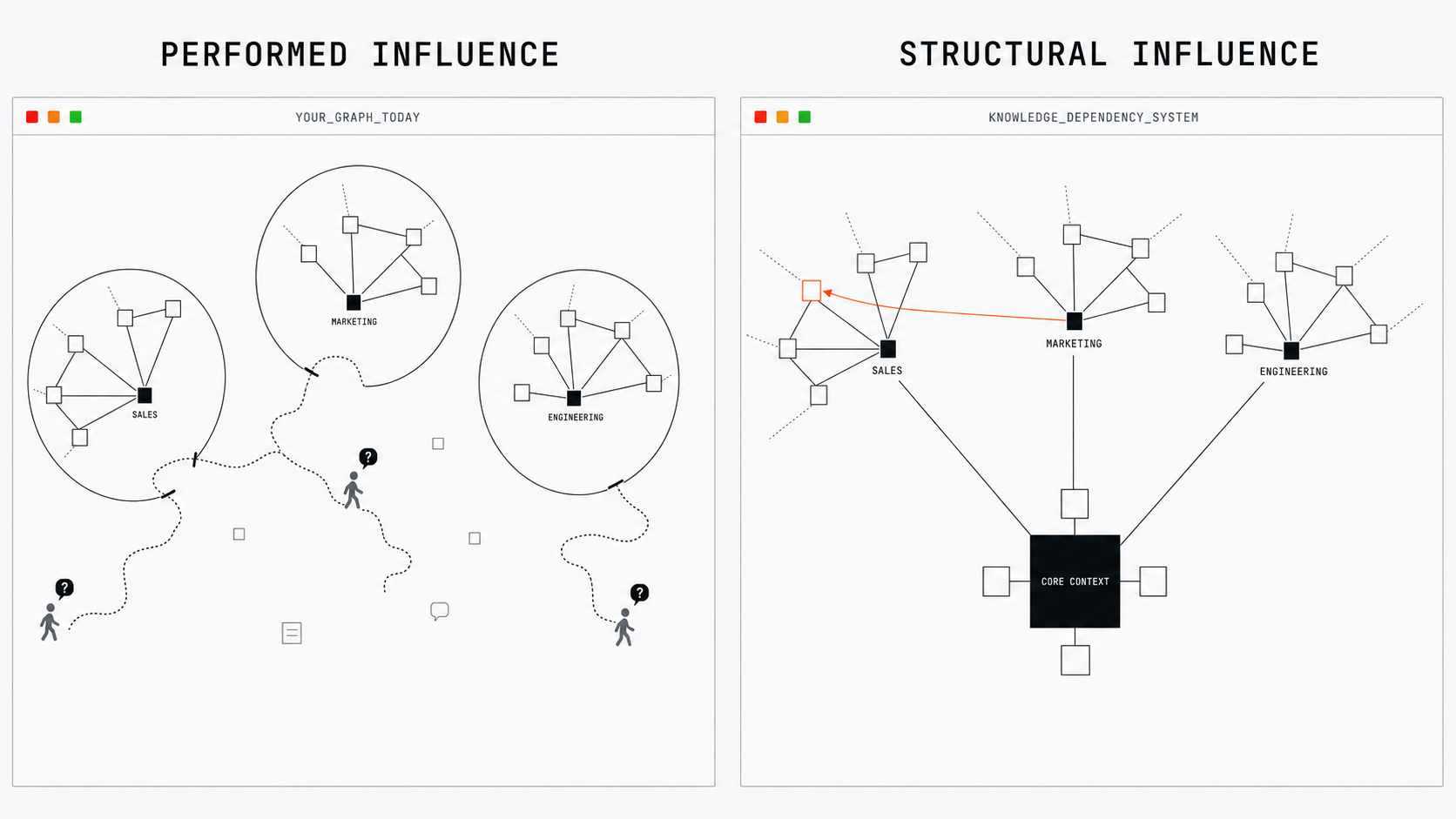
The end outcome should feel something like this:
Customer success could turn repeated customer friction into a proposed product change. From Claude, correctly permissioned, a CS lead sends engineering a spec with the pattern, source quotes, and call links.
But it isn't just a blob of evidence, it is pre-processed through a series of SKILLS so set by eng so by the time it hits as a PR it is a full fledged specification fitting their code standards and context-aware of the overall architecture.
Customer Success becomes the structural voice of the customer inside product decisions.
Partnerships could ask how the customer persona changed since June and see the belief, test, and learning timelapse. Partner briefs update with the approved ICP, so partners recruit for the market the company serves now.
Marketing could turn sales calls into current buyer language. Exact phrases are ranked, linked, reviewed, and released. The next campaign begins from what buyers said; its results feed the next release. Marketing becomes the company's market memory.
And sales is subscribed to that marketing tone of voice context, so they get the updates automatically, and so does product, and engineering. But each team can take that context and then tweak it a bit for their unique needs.
How to get started right now
Copy this whole article into your preferred agent and tell it to apply it to your unique company situation and constraints. Start with pointing the system at two to three high value business use cases and then use those to work backwards to the shared knowledge they all require.
That will give you the core context foundation you need and then install the owners, reviews, releases, and adoption path around those dependencies.
You'll find it easy to a single player version up in a few hours. Scaling from there gets hard.
Each next layer is as difficult as the previous combined, so moving from single player to get a few of your team members working from the same context for a single function reliably may take a few weeks to get it right. And team to team even more. So start off with the core two to three use case first to validate it for your end business needs before scaling.
And if you get stuck or need help, I help companies work through this process both architecting the solution and helping their teams learn how to use the system themselves.
The approach outlined above is based on months of learning deploying these systems in production for companies like Nickel.
We are still very early in regard to all things context. And there is more than one way to do this well.
If you're interesting in discussing working together or working on this problem yourself I am always open to sharing notes with other practitioners! Feel free msg me any time.